
Your night hike is ready, but your Petzl headlamp refuses to turn on. You might wonder if the CORE battery is dead or if you simply forgot to swap in fresh AAA cells. The solution is often simpler than you think once you know the correct charging steps.
This guide explains exactly how to charge Petzl headlamps using the CORE system or standard batteries. You will learn which cables work, how to read the LED indicators, and how to install backup power sources quickly.
Charge the CORE Battery Directly
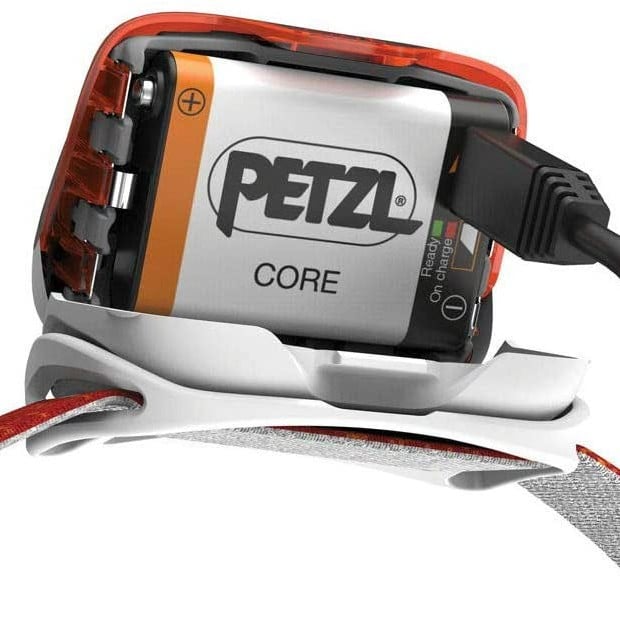
The primary method for powering modern Petzl lights involves the CORE rechargeable battery. This system uses a HYBRID CONCEPT design that lets you switch between rechargeable and disposable power sources easily. Charging this unit requires a standard USB cable and a compatible power source like a wall adapter or laptop.
Identify Your USB Port Type
You must match the cable to your specific battery generation to ensure a proper connection. Newer models released in 2025 and later feature a USB-C port for faster charging. Older legacy models utilize a Micro-USB port that requires a specific Micro-B end.
- USB-C Models: Use any standard USB-A to USB-C or USB-C to USB-C cable.
- Micro-USB Models: Use a standard USB to Micro-B cable often found with older electronics.
These cables are not proprietary to Petzl. You can use any standard charging cable you have at home. Connect one end to the battery port and the other to a power source to begin the process.
Interpret the LED Charging Indicators
The CORE battery features a built-in LED light that communicates the current charging status clearly. This indicator uses a simple color-coded system so you know exactly when your light is ready for action.
- Red Light: The battery is currently accepting a charge.
- Green Light: The battery has reached full capacity.
There is no percentage display on the unit. You will only see red while it charges and green when it is complete. The entire process typically takes three to four hours from a fully depleted state.
Protect Battery Health During Charging
Temperature plays a critical role in the efficiency and longevity of your lithium-ion power source. While the CORE battery performs excellently in freezing conditions during use, you should never attempt to charge it in extreme cold.
Lithium-ion chemistry reacts poorly to charging below 0°C (32°F). Always bring the battery to room temperature before connecting it to a power source. This simple step ensures optimal chemical reaction efficiency and extends the overall lifespan of the cell.
Install AAA Batteries as Emergency Backup

You can bypass the rechargeable system entirely by using standard AAA batteries if your CORE unit is dead. This feature works on all HYBRID CONCEPT models including the TIKKA, ACTIK, and ARIA series. This method provides an instant power source when no charger is available.
Open the Battery Compartment Safely
Accessing the internal battery slots requires opening the sealed casing without damaging the plastic housing. The design includes a small release tab at the 12 o’clock position above the main switch. You can open this using three distinct methods depending on your available tools.
- Fingernail or Coin: Gently push the tab with a fingernail or small coin.
- Key or Screwdriver: Press the release button behind the switch with a tool.
- Headstrap Buckle: Use the built-in opener on the Tikka strap buckle.
Place a cloth over the area if using metal tools to prevent scratches. The buckle method is ideal because it eliminates the need for external tools and reduces damage risk. Apply steady pressure rather than brute force to avoid cracking the case.
Insert Batteries with Correct Polarity
Proper installation ensures electrical contact and prevents damage to the internal components. Once the case is open, you will see clear markings indicating the correct orientation for the cells.
- Locate the (+) and (−) symbols inside each slot.
- Insert two AAA batteries with the button end (+) facing forward.
- Align the hinge tabs at the top of the case first.
- Press the bottom (6 o’clock) into place.
- Snap the top shut until the release button clicks securely.
Test the unit by turning it on immediately. If the batteries fall out when you tilt the lamp, the case is not fully closed. Realign the hinges and press firmly until you hear the snap.
Verify Compatible Headlamp Models
Not every Petzl light supports the CORE battery system or AAA backup. You must confirm your specific model matches the HYBRID CONCEPT design before attempting these power methods. Using the wrong power source can damage non-compatible units.
Models Supporting CORE and AAA Power
Most entry-level and mid-range Petzl headlamps support both power types. This flexibility makes them excellent choices for adventurers who need reliability in remote locations.
- TIKKID: Designed for children with 20 lumens output.
- TIKKINA: Compact model producing 300 lumens.
- TIKKA: Standard model with red light mode and 350 lumens.
- TIKKA CORE: Integrated rechargeable version with 450 lumens.
- ACTIK: Powerful light with 450 lumens output.
- ACTIK CORE: High-performance version with 625 lumens.
- ARIA 1R/2R RGB: Waterproof models with color modes up to 625 lumens.
- IKO: Versatile beam model with 625 lumens.
These models allow you to swap between the rechargeable CORE battery and standard alkaline cells seamlessly. This dual capability ensures you are never left in the dark due to a dead battery.
Models With Limited Power Options
Some advanced models have specific power requirements that differ from the standard hybrid design. The NAO LT is a notable example that relies exclusively on the CORE battery system.
This model does not support AAA batteries as a backup power source. Users of the NAO LT must ensure their CORE battery is always charged before heading out. Carry a spare CORE battery if you plan extended trips without access to electricity.
Troubleshoot Common Charging Problems
You may encounter issues where the headlamp fails to charge or indicate power correctly. Most problems stem from cable faults, dirty contacts, or user error during installation. Simple diagnostic steps can often resolve these issues without professional repair.
Diagnose No Light or Charging Failure
If the LED indicator does not light up when plugged in, check your connection chain immediately. A faulty cable or dirty port is the most common cause of charging failure.
- Swap the Cable: Try a different USB cable to rule out wire damage.
- Check the Power Source: Plug another device into the adapter or port to verify power.
- Clean the Port: Gently remove lint or dirt from the battery port with a dry toothbrush.
Ensure the cable is fully inserted into the port. A loose connection will prevent the charging circuit from engaging. If these steps fail, the battery itself may be damaged.
Address Persistent Red or Green Lights
A red light that never turns green suggests the battery cannot reach full capacity. This often indicates the cell has reached the end of its lifecycle or sustained internal damage.
The CORE battery is rated for approximately 300 charging cycles. If your unit is older than two years or has heavy use, consider replacing the battery. Conversely, if the light shows green but the lamp won’t turn on, clean the metal contacts on both the battery and the headlamp housing.
Maximize Battery Life and Performance
Proper maintenance extends the usable life of your CORE battery significantly. Lithium-ion chemistry degrades over time, but smart habits can slow this process and ensure reliable performance for years.
Follow Optimal Charging Practices
Avoid letting the battery drain completely before recharging. Partial charges are better for lithium-ion cells than full depletion cycles. Store the battery at roughly 50% charge if you will not use it for several weeks.
Keep the battery away from extreme heat sources like direct sunlight or hot cars. High temperatures accelerate chemical degradation within the cell. Always charge at room temperature for the best results and longest life.
Understand Lifespan Limitations
Every rechargeable battery has a finite lifespan determined by time and usage cycles. The CORE battery is warranted for two years or 300 cycles, whichever comes first.
- Cycle Count: Capacity decreases after 300 full charges.
- Time Limit: Chemical aging occurs even without use.
Replace the battery if you notice significantly reduced runtime. Carrying spare AAA batteries is a smart strategy for long trips where consistent high output is critical.
Final Thoughts on Charging Your Petzl Headlamp
Mastering how to charge Petzl headlamp units ensures you stay safe and visible during night adventures. The CORE battery system offers remarkable flexibility with its ability to switch to AAA backups instantly. Remember to use the correct USB cable and avoid charging in freezing temperatures to protect battery health.
Keep your gear ready by testing your light before every trip. Store a spare set of AAA batteries in your pack for emergencies. With these simple practices, your Petzl headlamp will provide reliable illumination for hundreds of nights.
Frequently Asked Questions About Petzl Headlamp Charging
Can I use any USB cable to charge my Petzl CORE battery?
Yes, you can use any standard USB cable that matches your port type. Newer models use USB-C while older ones use Micro-USB. These are common cables used for many electronics and do not need to be brand specific.
How do I know when the CORE battery is fully charged?
The built-in LED indicator turns green when the battery reaches full capacity. A red light means it is still charging. There is no percentage display available on the battery itself.
What should I do if my Petzl headlamp won’t turn on with AAA batteries?
Ensure the batteries are inserted with the correct polarity. The positive end must face forward as marked inside the compartment. Also verify the case is snapped shut completely to make electrical contact.
Is it safe to charge the CORE battery in cold weather?
No, you should not charge the battery in freezing temperatures. While it performs well in the cold during use, charging below 0°C can damage the lithium-ion cells. Always charge at room temperature.
How long does the CORE battery last before needing replacement?
The battery is rated for approximately 300 charging cycles or two years of use. Performance may degrade after this point. Replace the unit if you notice significantly shorter runtimes.
Can I use AAA batteries in all Petzl headlamp models?
No, only models with the HYBRID CONCEPT design support AAA batteries. The NAO LT model uses only the CORE battery. Check your specific model specifications before attempting to install disposable cells.