
You are deep on a night trail when your Black Diamond headlamp starts blinking red. This warning light signals low battery or connection issues that demand immediate attention before total failure.
This guide explains exactly why the red light flashes and how to fix it fast. You will learn simple steps to replace batteries, clean contacts, and reset your gear for reliable light.
Decode the Red Blinking Signal on Your Headlamp
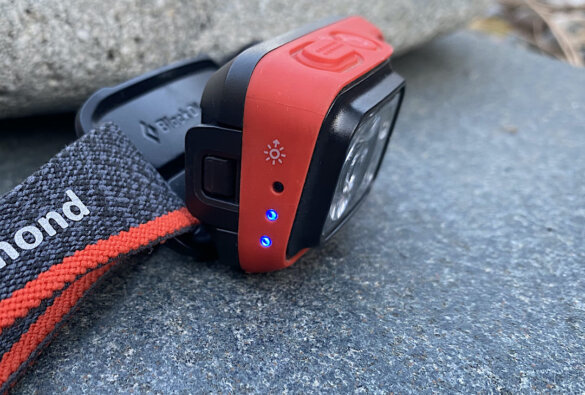
A blinking red light on your Black Diamond headlamp is a deliberate alert system. It communicates specific status updates rather than random electronic glitches.
Low Battery Warning Signs
The most frequent cause for a Black Diamond headlamp blinking red is low battery power. The device issues this warning to give you time to swap cells before darkness falls.
Look for these specific signs:
* Flashes occur every 3 to 5 seconds
* Light output dims significantly on high modes
* You have used the lamp extensively without changing cells
Replace your batteries immediately if you see these rhythmic flashes. Lithium-ion models may vibrate or change blink patterns as they near depletion.
Faulty Battery Contact Issues
Poor electrical contact can mimic a dead battery even when fresh cells are installed. Dirt, corrosion, or slight misalignment interrupts the power flow to the LED.
Visual cues include:
* Blinking stops when you press firmly on the battery door
* Visible grime or rust on the metal terminals
* Batteries feel loose or rattle inside the compartment
Clean the terminals or adjust the battery position to restore a solid connection.
Temperature-Related Performance Drops
Extreme cold reduces battery efficiency and triggers thermal protection warnings. Your Black Diamond headlamp blinking red often occurs in temperatures below 14°F (-10°C).
Signs of cold-induced issues:
* Blinking starts only after exposure to freezing air
* Lamp functions normally when brought indoors
* Light output fluctuates with temperature changes
Keep spare batteries inside your jacket to keep them warm. Warm batteries perform significantly better in freezing conditions.
Check and Replace Your Batteries Immediately

Replacing the power source is the fastest solution for a Black Diamond headlamp blinking red. Fresh energy often resolves the issue instantly.
Use High-Quality Battery Types
Not all power cells deliver consistent voltage under load. Alkaline batteries struggle in cold weather and drain faster than lithium alternatives.
Recommended battery options:
* Lithium AA cells for extreme cold and long life
* NiMH rechargeable batteries for regular nightly use
* Avoid cheap alkaline brands that leak or fail early
Switching to premium lithium batteries often eliminates false low-power warnings.
Test With Fresh Batteries Step-by-Step
Follow this sequence to ensure proper installation and testing.
- Turn the headlamp completely off before opening.
- Open the battery compartment by twisting or sliding the cover.
- Insert two brand-new batteries matching the plus and minus diagrams.
- Close the compartment securely and power on the device.
The red blinking should stop if the issue was depleted power. Never mix old batteries with new ones or combine different chemistries.
Clean the Battery Terminals for Better Contact
Corrosion and sweat residue on metal contacts often cause a Black Diamond headlamp blinking red. Cleaning these areas restores full electrical conductivity.
Step-by-Step Cleaning Guide
Gather a cotton swab, isopropyl alcohol, and a soft cloth for this task.
Follow these cleaning steps:
1. Remove all batteries from the compartment.
2. Dip a cotton swab in isopropyl alcohol or white vinegar.
3. Gently scrub the spring and flat metal terminals until shiny.
4. Wipe the area dry with a clean cloth before reinserting cells.
Your light should return to solid white operation after this process. Perform this maintenance every few months if you use your gear frequently.
Reset the Headlamp to Clear Glitches
Electronic components sometimes retain temporary errors that cause false alerts. A hard reset clears these glitches and refreshes the internal circuitry.
How to Reset Your Headlamp
This process works for most Spot, Storm, and Icon models experiencing erratic behavior.
- Remove the batteries from the headlamp completely.
- Press and hold the power button for 15 seconds to discharge residual power.
- Reinsert the batteries carefully.
- Turn the unit on to check for normal operation.
This action does not erase your brightness settings but resets the system logic. It often stops the red blinking if no hardware damage exists.
Check for Firmware Updates on Smart Models

Newer Black Diamond headlamps feature USB connectivity for software updates. Outdated firmware can cause incorrect battery readings and false warnings.
Models That Support Updates
Check if your specific model supports firmware upgrades via computer.
Compatible models include:
* Black Diamond Storm series
* Black Diamond Spot Gen 4 and later
* Black Diamond Icon rechargeable models
Visit the official support page to download the latest tools. Updating ensures your headlamp interprets battery levels accurately.
How to Update Firmware
Connect your device to a computer to run the update utility.
- Visit the Black Diamond Equipment support website.
- Search for your specific headlamp model number.
- Download the firmware updater tool for your operating system.
- Connect the headlamp via USB and follow the screen prompts.
Successful updates often improve battery sensing algorithms and eliminate false red lights.
Prevent Future Blinking Issues With Care
Proactive maintenance prevents the frustration of a Black Diamond headlamp blinking red during critical moments.
Store With Care
Proper storage extends battery life and prevents terminal corrosion.
Storage best practices:
* Remove batteries during long periods of non-use
* Keep the unit in a cool, dry place away from sunlight
* Avoid leaving gear in hot cars or damp backpacks
Removing batteries prevents leakage that damages internal contacts over time.
Rotate Spare Batteries
Old spare batteries lose capacity even when not in use. Label your spares with purchase dates to track their age.
Use the oldest batteries first to maintain peak performance. Lithium cells last longer but still degrade after several years on the shelf.
Carry a Backup Light Source
Always pack a secondary light when heading into the dark. A small keychain LED serves as an excellent emergency backup.
This precaution ensures safety if your primary headlamp fails unexpectedly.
When to Contact Black Diamond Support
Persistent blinking after troubleshooting may indicate a hardware failure requiring professional service.
Signs of Hardware Failure
Contact support if you observe these specific symptoms.
Warning signs include:
* Red blinking continues with brand-new batteries
* No response after cleaning and resetting the unit
* Visible damage, burn smells, or unresponsive charging ports
These issues suggest internal component failure rather than user-fixable problems.
Contact Information
Black Diamond offers a limited warranty on most headlamp models.
Reach out via:
* Official support page at BlackDiamondEquipment.com
* Customer service email for warranty claims
* Phone support for immediate assistance
Have your model name and proof of purchase ready for faster service.
Frequently Asked Questions About Black Diamond Headlamp Blinking Red
Why does my Black Diamond headlamp blink red even with new batteries?
This usually indicates dirty contacts or a need for a system reset. Clean the terminals thoroughly and perform a hard reset by removing batteries and holding the power button.
Can cold weather cause a Black Diamond headlamp blinking red?
Yes, extreme cold reduces battery efficiency and triggers low-power warnings. Keep spare batteries warm in your pocket to prevent this issue during winter hikes.
How do I stop my headlamp from blinking red permanently?
Replace old batteries with high-quality lithium cells and clean the metal contacts regularly. Updating firmware on smart models also prevents false alerts.
Is a blinking red light a sign of permanent damage?
Rarely. Most blinking red lights result from low power or poor connections. Only contact support if the issue persists after replacing batteries and cleaning.
Do all Black Diamond headlamps blink red for low battery?
Most modern models use a red blink or pulse to signal low power. Check your specific user manual to confirm the indicator pattern for your device.
Key Takeaways for Fixing Black Diamond Headlamp Blinking Red
A Black Diamond headlamp blinking red is usually a simple warning for low battery or dirty contacts. Replacing cells with high-quality lithium options and cleaning terminals solves most cases instantly.
Regular maintenance and proper storage prevent these warnings from interrupting your adventures. Carry spare batteries and a backup light to ensure you never face the dark unprepared.