
Your headlamp battery died right before your night hike, and you are scrambling to find a power source. Knowing how to charge headlamp units correctly ensures you stay safe and avoid being stuck in the dark.
This guide explains exactly how to locate ports, interpret indicator lights, and calculate recharges from a power bank. You will learn essential tips for cold weather and how to maximize battery life on long trips.
Locate and Access the USB-C Charging Port
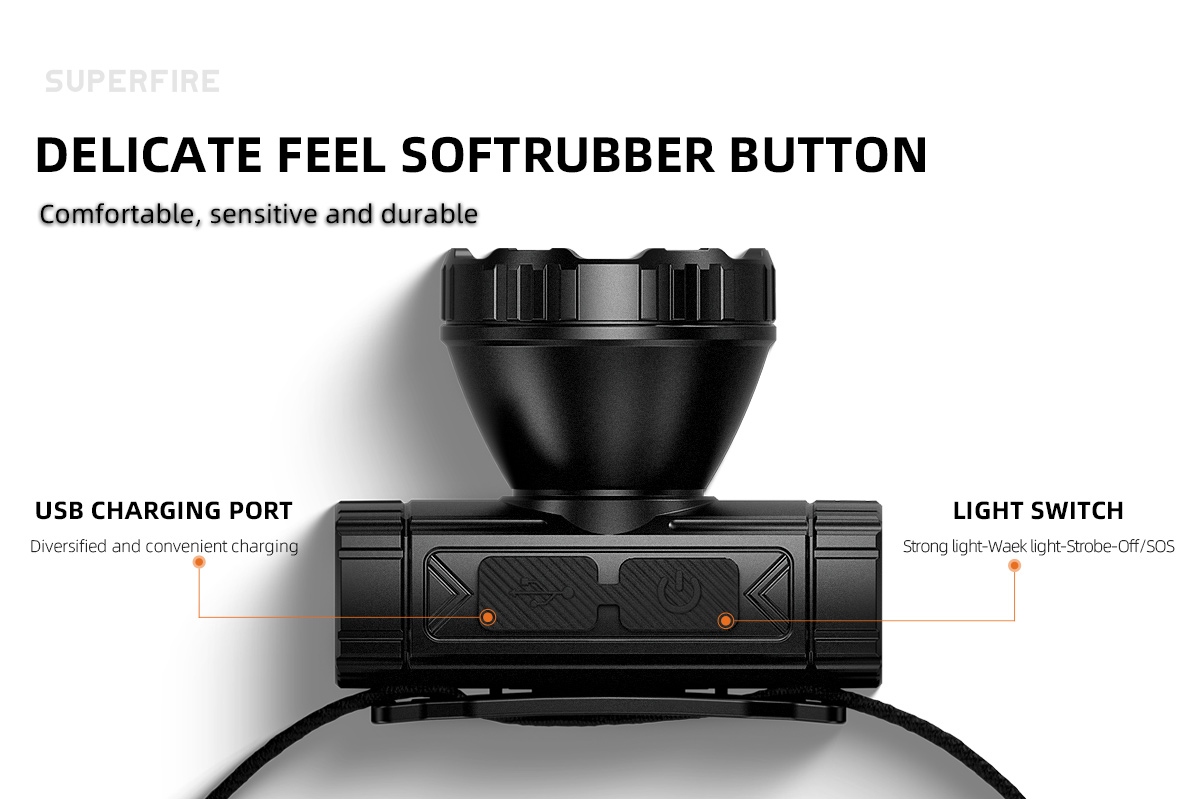
Most modern rechargeable headlamps feature a protected charging port hidden under a flexible flap. You will typically find this port on the rear or side of the light unit to keep it away from direct moisture.
Identify the Protected Connector
Look for a small rubber or silicone cover labeled with a lightning bolt or USB symbol. Gently pull this flap back to reveal the USB-C connector inside. Never force a stuck flap as this can tear the seal and ruin water resistance.
Insert the Correct Cable
Plug a USB-A to USB-C or USB-C to USB-C cable into the exposed port. The USB-C design is reversible, so you can insert it facing either way without damaging the pins. Ensure the connection feels snug before proceeding to the power source.
Start Charging with Safe Power Sources
Connecting your device to the right power source prevents electrical surges and ensures efficient energy transfer. Always plug the cable into the wall adapter or power bank before connecting it to the headlamp.
Monitor LED Indicator Lights
A red LED light will illuminate immediately to confirm the charging process has started. Some models may blink red initially before switching to a steady glow while the battery fills up.
Disconnect When Fully Charged
Wait until the indicator light turns solid green, which signals a full battery. Unplug the cable immediately after the green light appears and push the protective flap back into place tightly.
Decode Charging Indicator Light Signals
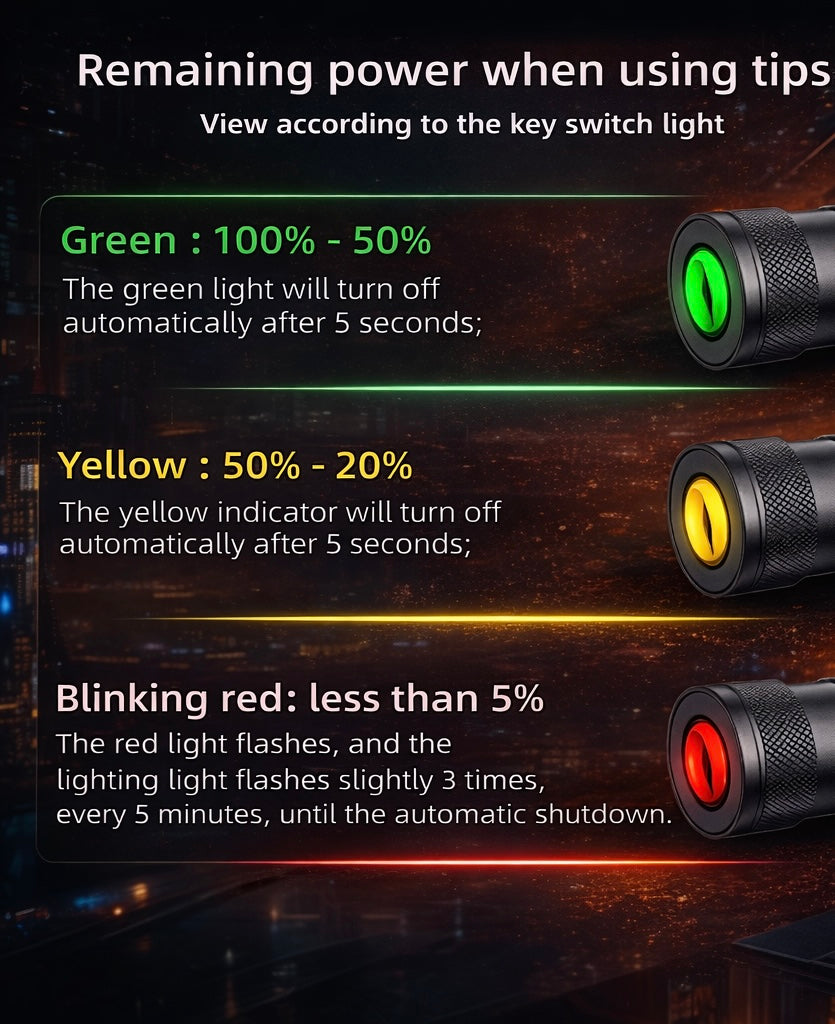
Understanding what your headlamp lights mean helps you troubleshoot issues before they leave you in the dark. Different colors and blinking patterns convey specific status updates about your battery health.
What Does a Red Light Mean?
A steady red light indicates the battery is actively charging and accepting power. If the red light blinks rapidly, check for a dirty port, a faulty cable, or an incompatible power source.
What Does a Green Light Confirm?
A solid green light confirms the battery has reached 100 percent capacity and is ready for use. If the light never turns green after several hours, try a different cable or wall adapter to rule out equipment failure.
Estimate Recharges From a Power Bank

Calculating how many times you can recharge your light helps you plan for multi-day trips without grid access. You must account for energy loss during voltage conversion to get accurate numbers.
Understand Real-World Capacity
A power bank labeled 10,000mAh does not deliver full capacity due to heat and conversion inefficiency. Expect only about 65 percent efficiency, meaning a 10,000mAh unit provides roughly 6,500mAh of usable power.
Calculate Full Charge Cycles
Divide the usable power bank capacity by your headlamp battery size to find total recharges. For example, a 500mAh headlamp can recharge about 13 times from a standard 10,000mAh power bank.
Optimize Battery Performance in Cold Weather
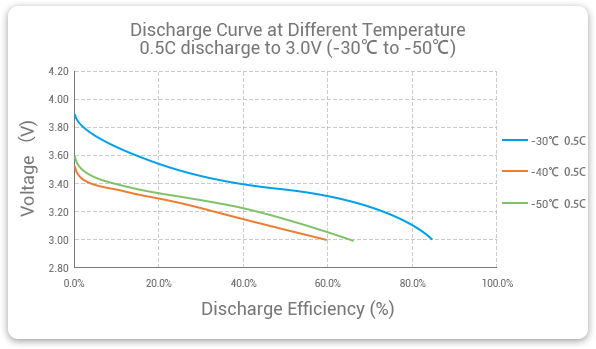
Cold temperatures drastically reduce the output of standard alkaline and NiMH batteries. Lithium-ion batteries found in USB headlamps retain significantly more capacity in freezing conditions.
Why Lithium-Ion Excels in Freezing Temps
Alkaline batteries can lose up to 80 percent of their capacity at zero degrees Fahrenheit. Li-ion cells maintain 70 to 80 percent output even in sub-zero environments, making them essential for winter camping.
Keep Your Gear Warm Before Use
Store your headlamp inside your jacket close to your body heat when not actively using it. Warming the battery briefly before turning it on helps restore chemical reaction rates and improves brightness.
Extend Runtime Through Smart Brightness Control
Most headlamps default to maximum brightness when turned on, which drains the battery quickly. Managing your light modes manually can double or triple your total runtime on a single charge.
Cycle Through Lighting Modes
Press the power button repeatedly to switch between high, medium, spotlight, and low settings. Use the lowest setting possible for camp tasks to conserve energy for when you really need high output.
Utilize Auto-Dimming Features
Some models automatically reduce brightness after an hour to prevent overheating and save power. Rely on this feature during long nights to ensure your light does not die unexpectedly.
Avoid Common Charging Mistakes
Simple errors during the charging process can damage your gear or reduce battery lifespan over time. Avoiding these pitfalls ensures your headlamp remains reliable for years.
Never Use Damaged Cables
Frayed or bent cables cause intermittent connections and can damage the charging port. Always inspect your cable before plugging it in and replace it if you see any wear.
Do Not Charge in Wet Conditions
Even water-resistant headlamps should not be charged while wet or in heavy rain. Moisture inside the port can cause a short circuit, so always dry the area thoroughly before connecting power.
Choose the Right Headlamp for Your Needs

Selecting a model that fits your specific activity ensures you have enough power without carrying unnecessary weight. Different users require different battery capacities and features.
Options for Minimalist Backpackers
Lightweight models with 500 to 1,250mAh batteries are perfect for reducing pack weight. These small units recharge easily from tiny power banks and last a full week on moderate use.
Options for Winter Explorers
Choose units with large Li-ion cells and operating ranges down to minus 20 degrees Celsius. High-lumen output and reflective headbands add extra safety for snowy night adventures.
Frequently Asked Questions About Headlamp Charging
How long does it take to charge a headlamp?
Charging times vary by battery size, ranging from 1.5 hours for small units to 6 hours for large capacity models. Watch for the green LED light to know exactly when your specific device is full.
Can I use any USB cable to charge my headlamp?
You should use the provided cable or a high-quality USB-C cable to ensure proper current flow. Cheap or damaged cables may charge slowly or fail to trigger the charging indicator.
Is it safe to leave my headlamp charging overnight?
Only leave it unattended if the manufacturer explicitly states it has overcharge protection. It is generally safer to unplug the device once the green light appears to preserve battery health.
Why is my headlamp blinking red while charging?
Rapid red blinking usually indicates a poor connection, a dirty port, or an incompatible power source. Clean the port gently with a dry tool and try a different cable to fix the issue.
How many times can a 10,000mAh power bank charge my headlamp?
A standard 10,000mAh power bank can charge a small 500mAh headlamp about 13 times. Larger 2,500mAh models will only get about two to three full recharges from the same power bank.
Key Takeaways for Charging Your Headlamp
Mastering how to charge headlamp devices ensures you always have light when you need it most. Remember to check indicator lights, protect charging ports from moisture, and calculate your power bank needs before every trip.
Proper maintenance and smart usage habits will extend your battery life and keep your gear reliable. Test your setup at home before heading into the backcountry to guarantee a safe and bright adventure.