
When your Dorcy headlamp stops working, it often happens right when you need reliable light the most. Whether you own the 41-4335 Ultra HD or the magnetic 41-2614 model, power failures usually stem from simple issues like dead batteries or charging faults.
This guide helps you diagnose and fix a Dorcy headlamp not working by checking power sources, resetting internal circuits, and verifying model-specific features. You will learn actionable steps to restore your light without needing professional repair tools.
Identify Your Specific Dorcy Headlamp Model
Troubleshooting requires knowing exactly which unit you possess because solutions vary by power source. Dorcy produces both alkaline battery units and rechargeable lithium-ion systems with different failure modes.
Locate Model Numbers on Housing
Check the battery compartment or headband housing for a printed label. Common models include the 41-4335 with 530 lumens and the weather-resistant 41-2614 Magnetic Headlight. Identifying this number ensures you follow the correct diagnostic path for your device.
D Between Alkaline and Lithium Power
Alkaline models use standard AA or AAA cells while rechargeable units rely on built-in 3.7v batteries. Using a charging cable on a non-rechargeable model causes damage, so verify your power type before proceeding with any fixes.
Resolve Power Supply Failures First
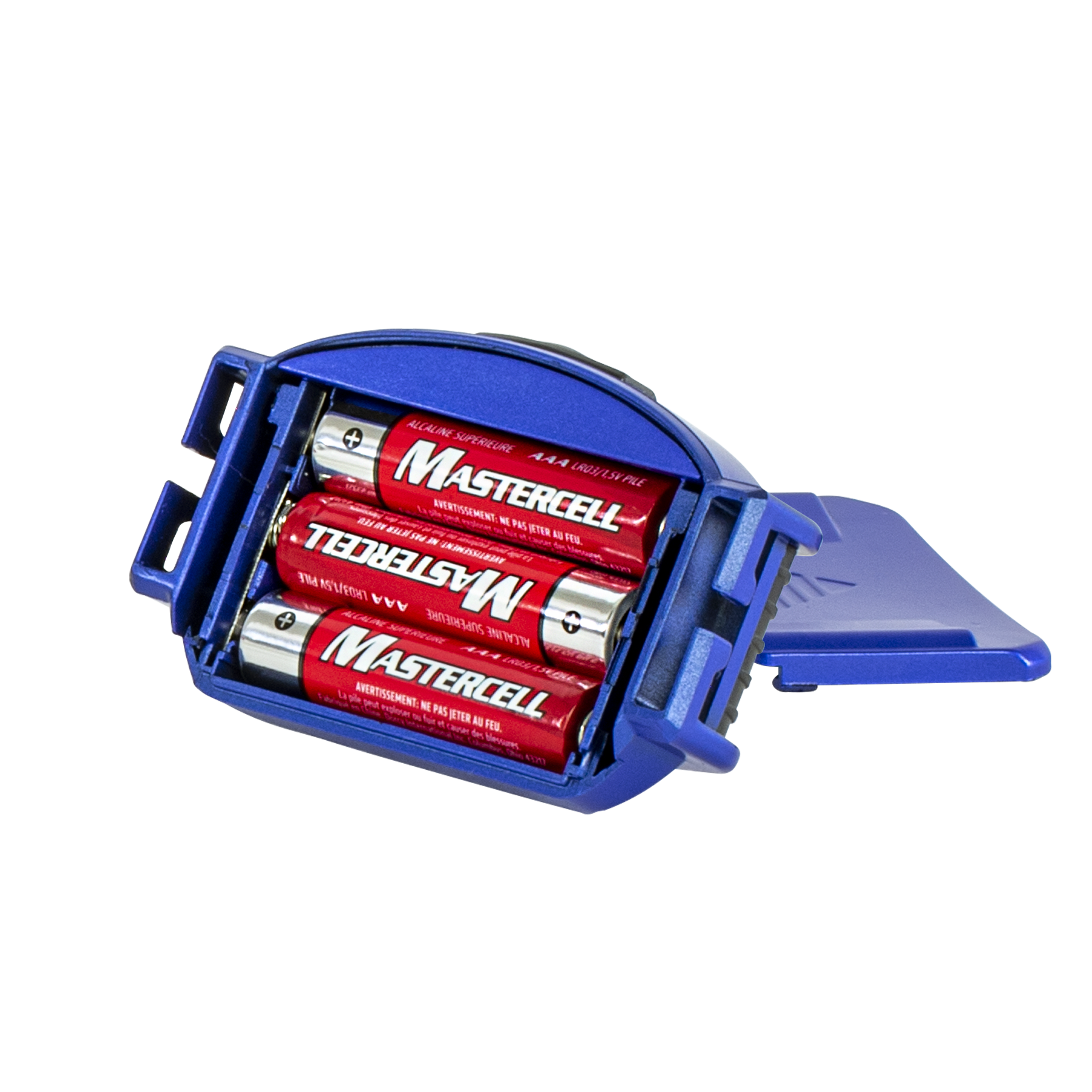
Most “Dorcy headlamp not working” cases result from simple power interruptions rather than broken electronics. Start your diagnosis here to rule out the most common causes quickly.
Test Battery Charge and Quality
Replace old alkaline cells with fresh name-brand batteries even if they appear functional. For rechargeable models, plug the unit in and look for indicator lights that signal charging progress or full capacity.
- Flashing red lights typically indicate active charging.
- Solid red lights often mean the battery is fully charged.
- No light suggests a faulty cable or dead battery cell.
Verify Correct Battery Installation
Incorrect polarity prevents the circuit from completing even with fresh power sources. Open your battery compartment and ensure every cell aligns perfectly with the plus and minus markings inside the housing.
- Remove all existing batteries from the compartment.
- Check metal contacts for dirt or corrosion buildup.
- Insert new batteries matching the directional arrows exactly.
- Close the compartment tightly to secure electrical contact.
Troubleshoot Rechargeable Charging Systems
If your rechargeable Dorcy headlamp is not working, the issue often lies in the charging chain rather than the battery itself. Inspect cables and ports before assuming the unit is dead.
Inspect Cables and Charging Ports
Examine your USB or Micro-USB cable for fraying or bends that interrupt power flow. Check the charging port on the headlamp for lint or debris that might block the connection.
- Use compressed air to gently clear dust from the port.
- Ensure the rubber protective flap is fully open during charging.
- Try a different wall adapter rather than a low-power computer USB port.
Address Internal Connection Issues
Some models like the 41-4299 feature internal USB charging boards with specific wiring configurations. A loose red wire connection inside the housing can stop charging entirely though this requires disassembly to verify.
Diagnose Switch and Internal Component Faults
When power is confirmed but the light remains off, mechanical switches or internal corrosion may be the culprit. These issues often mimic total power failure.
Test Push-Button Switch Functionality
Press the power button firmly to see if the light responds to increased pressure. If the light flickers when you wiggle the button, the internal contacts may be worn or dirty.
- Press the button repeatedly to clear minor contact resistance.
- Listen for a distinct click sound indicating mechanical action.
- Watch for any brief flash of light during pressing.
Clean Corroded Battery Contacts
Moisture exposure can cause white or green corrosion on metal terminals inside the battery compartment. This buildup blocks electricity flow and prevents your Dorcy headlamp from working properly.
- Remove all power sources immediately.
- Dip a cotton swab in rubbing alcohol.
- Gently scrub metal contacts until shiny.
- Allow the compartment to dry completely before reassembly.
Interpret Indicator Light Patterns
Your headlamp communicates its status through specific light behaviors that help pinpoint the exact problem. Understanding these signals saves time during diagnosis.
Decode Flashing and Solid Lights
A blinking red light usually means the unit is charging normally while a solid red light indicates full capacity. If the light turns on briefly then shuts off, an auto-shutoff timer or low voltage protection may be active.
| Light Behavior | Probable Cause |
|---|---|
| No light when docked | Dead battery or broken cable |
| Flashing red | Normal charging process |
| Solid red | Fully charged battery |
| Brief flash then off | Auto-timer or low voltage |
Recognize Auto-Shutoff Safety Features
High-output models like the Adventure Max lantern automatically turn off after four minutes in high mode to prevent overheating. This safety feature often confuses users who think their Dorcy headlamp is not working.
- Press the switch again to reactivate the light.
- Switch to a lower brightness mode for longer runtime.
- Consult your manual to confirm timer specifications.
Perform a Hard Reset on Rechargeable Units
Software glitches or deep discharge states can lock up the internal controller of rechargeable headlamps. A hard reset clears these temporary faults effectively.
Execute the Reset Procedure
Unplug the charger and hold the power button down for 15 to 30 seconds continuously. Release the button and attempt to turn the light on or reconnect the charger to see if normal function returns.
This method works particularly well on models like the 41-4379 after long storage periods. It forces the control circuit to reboot and often resolves unresponsive behavior.
Replace Faulty Components When Necessary
If diagnostics point to hardware failure, you may need to replace batteries or the entire unit depending on the severity.
Swap Out Depleted Batteries
Alkaline models require regular battery replacement as cells lose charge over time. Never mix old and new batteries or different brands as this reduces performance and causes leakage.
Consider Internal Battery Replacement
Lithium-ion batteries degrade after two to three years of use and may hold no charge. While some users attempt DIY replacement by soldering new 3.7v cells, this voids warranties and carries fire risks.
- Contact Dorcy support for professional repair options.
- Purchase a new unit if repair costs exceed replacement value.
- Avoid internal repairs unless you have electronics experience.
Contact Dorcy Support for Warranty Claims
When troubleshooting fails to restore function, leverage the manufacturer warranty for assistance. Dorcy offers support for defective units within specific timeframes.
Verify Your Warranty Coverage
Most Dorcy products include a one-year warranty against manufacturing defects. Some specialized lines may offer lifetime coverage, but you must provide proof of purchase to qualify.
Submit a Support Request
Gather your model number and purchase receipt before contacting customer service. You can reach Dorcy support by calling 1-800-654-7086 or submitting an online form at their official website.
- Describe the issue clearly with steps already taken.
- Include photos of the unit and any error indicators.
- Provide your model number for faster processing.
Prevent Future Headlamp Failures
Regular maintenance extends the life of your lighting gear and prevents unexpected outages during critical moments. Simple habits keep your Dorcy headlamp reliable.
Establish Routine Maintenance Habits
Charge rechargeable units monthly even when not in use to maintain battery health. Store alkaline-powered lights with batteries removed to prevent leakage damage during long-term storage.
- Keep the device in a dry, cool environment.
- Clean contacts every few months with alcohol.
- Avoid exposing the unit to extreme temperatures.
Final Thoughts on Fixing Your Dorcy Headlamp
Most “Dorcy headlamp not working” issues resolve quickly by checking batteries, cleaning contacts, or resetting the internal circuit. By identifying your specific model and following these targeted steps, you can often restore full function without professional help.
Take action now by checking your battery orientation and testing your charging cable. If these steps fail, contact Dorcy support with your model number to explore warranty options.
Frequently Asked Questions About Dorcy Headlamps
Why is my rechargeable Dorcy headlamp not turning on?
Your unit may have a deeply discharged battery or a faulty charging cable. Try holding the power button for 30 seconds to reset the circuit, then charge it for at least 30 minutes using a different wall adapter.
How do I know if my Dorcy headlamp batteries are dead?
Alkaline models will simply fail to light up or appear dim. Rechargeable units often show no indicator light when plugged in or flash red continuously without ever showing a solid full-charge light.
Can I replace the internal battery in my Dorcy headlamp?
While technically possible for experienced users, opening the housing voids your warranty and risks damaging the waterproof seal. Contact Dorcy support for authorized repair or replacement options instead.
What does it mean if my Dorcy headlamp flashes red?
Flashing red typically indicates the unit is actively charging. If it flashes continuously without turning solid after several hours, the battery may be defective or the charging port damaged.
Does the Dorcy Adventure Max have an auto-shutoff timer?
Yes, the Adventure Max lantern automatically turns off after four minutes in high mode to prevent overheating. Press the switch again to reactivate it or switch to a lower brightness setting for extended use.